This section is a work-in-progress and has not been finished yet
Column color-coding
Worksheet column headings are color-coded based on:
- Whether it is mandatory for cells in that column to have a value
- Whether the cell values are unrestricted, or must be selected from a pick-list
| Column header color | Mandatory | Input type |
|---|---|---|
| Red | Yes | Unrestricted |
| Orange | Yes | Pick-list |
| Blue | No | Pick-list |
| Grey | No | Unrestricted |
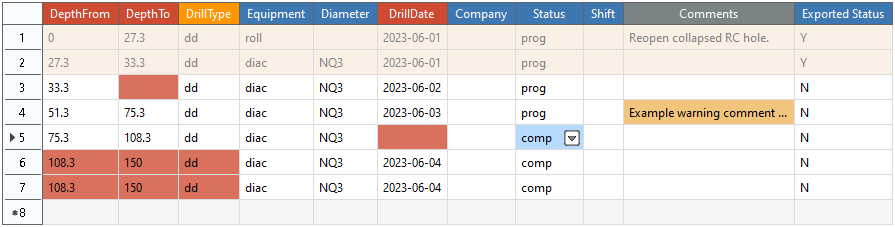
See the following example:

Cell color-coding
Cell values are color coded based on:
- The export status of the cell.
- The validation status of the cell.
- Whether the cell is selected or not.
| Cell color | Description |
|---|---|
| White | An active cell that has no validation errors. |
| Yellow / Orange | An active cell that has one or more validation warnings. |
| Red | An active cell that has one or more validation errors. |
| Blue | An active cell that is currently selected. |
| Tan / Beige | A cell that has already been exported, and now can no longer be edited. |
See the following example:
Comments
0 comments
Please sign in to leave a comment.