Re-run rules
Users can click on the Re-run rules button to trigger a manual refresh and re-run of all of the OCRIS Mobile validation rules that apply to the logger. This is generally not needed in usual operation of the software, but the administrator may have designed some custom rules which require this button to be pressed on occasion.
Row sorting and filtering
The 'row sorting and filtering' menu offers 4 options:
Sort rows
Users can click on the Sort rows button to bring up an interface that allows them to sort the rows in the current grid.
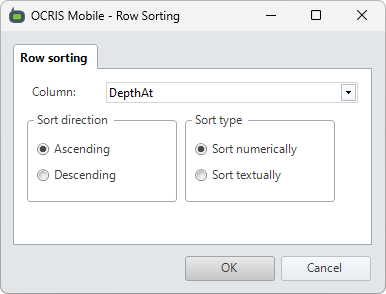
The following options can be set:
- Column - The column that the rows will be sorted by.
- Sort direction - Controls whether the rows will be sorted in ascending or descending order.
- Sort type - Controls whether rows will be sorted numerically or textually.
Remove sort
Users can click on the Remove sort button to remove any sorting that has been applied to the current grid via the Sort rows option, and revert the grid to its default state.
Filter rows
Users can click on the Filter rows button to bring up an interface that allows them to set a filter for the rows in the current grid.
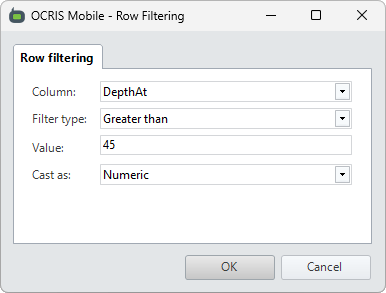
The following options can be set:
- Column - The column containing the value to filter the rows on.
- Filter type - The type of filter to apply (see below).
-
Value - The comparison value in the filter. Can use
%as a wildcard inLikeandNot likefilters. - Cast as - Controls whether values will be cast as text or as numeric values.
The following filter types are available:
- Equals - Show all rows with values that are equal to the filter value.
- Not equals - Show all rows with values that are not equal to the filter value.
- Like - Show all rows with values that match the filter's LIKE expression.
- Not like - Show all rows with values that don't match the filter's LIKE expression.
- Less than - Show all rows with values that are less than the filter value.
- Less than or equal to - Show all rows with values that are less than or equal to the filter value.
- Greater than - Show all rows with values that are greater than the filter value.
- Greater than or equal to - Show all rows with values that are greater than or equal to the filter value.
Clear filter
Users can click on the Clear filter button to clear any filtering that has been applied to the current grid via the Filter rows option, and revert the grid to its default state.
Comments
0 comments
Please sign in to leave a comment.